
Libcode Libcode

  • Home
  • LibCode Index
  • Contact
Home / 08.07 Reports / 08.07.01 Accession Register

08.07.01 Accession Register

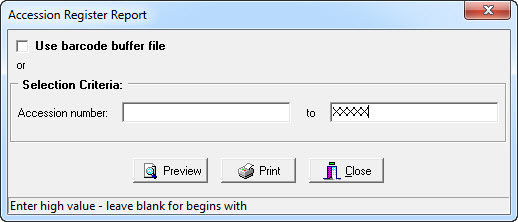
Accession Register Report allows you to print a list of resources within a specific range of accession numbers.
Arrow

Once the accession number parameters have been set the report generated will list the following details –

  • Accession Number.
  • Barcode.
  • Title.
  • Place of Publication.
  • GMD.
  • Call Number & Site.
  • Status.
  • Acquisition Date (and if applicable the Status Date).
  • Supplier / Invoice / Order Number.
  • Cost.

You can also use a Barcode Buffer file to refine your search criteria.

accession register 08.07 Reports

Related Articles

  • 08.07.02 Report Showing Students Who Do Not Have Items on Loan
  • 08.07.03 Barcodes Listing
  • 08.07.04 Audit List (Supplier)
  • 08.07.05 Audit List (Fund)

Categories

  • 1301 Overview
  • 901.03 The Modules
  • 702 Getting Started
  • 103 LibCode Suite Menu
  • 704 Enquiry
  • 1605 Data Entry
  • 305.03 Editing Resource
  • 305.01 Adding a New Resource
  • 405.09 Linking resources
  • 205.10 Adding to the Thesaurus
  • 106 Finding a Classification Number
  • 1507 Circulation
  • 307.06 Extending Loans
  • 407.07 Reports
  • 107.08 Reservations
  • 407.13 Borrowers
  • 007.14 Groups
  • 507.07.04 Returned Loans
  • 207.07.05 Unreturned Loans
  • 1108 Utilities
  • 308.01 Inload-Outload
  • 708.02 Backup-Restore
  • 1108.06 Updating
  • 1008.07 Reports
  • 908.08 Setup
  • 508.06.01 Catalogue
  • 108.06.02 Barcode Record Bulk Updating
  • 808.06.06 Updating Circulation
  • 608.06.06.08 Synchronising Borrowers and Rolling Over Student Data
  • 208.06.07 Culling Records
  • 508.08.01 Authority Files
  • 508.08.03 Circulation Options
  • 408.08.03.01 Loan Period, Loan Extensions & Due Date Overview
  • 109 Junior HYG (Optional)
  • 1810 Stocktake
  • 511 SCIS & CMEWeb Uploads
  • 512 Regular Tasks
  • 213 Support Options
  • 814 Installation, Upgrades, etc

Most Viewed

  • 08.06.06.08.06 Using the Dynamic Student Report (EQ Schools using Version 7) 787
  • 01 Overview – LibCode 6.7.9.0 406
  • 02.03 Installation Requirements for the Libcode Suite 397
  • 02.04 Setting up – Customising LibCode Suite 337
  • 02.02 Methods of Installation 330

Social

Article Categories

01 Overview (13) 01.03 The Modules (9) 02 Getting Started (7) 03 LibCode Suite Menu (1) 04 Enquiry (7) 05 Data Entry (16) 05.01 Adding a New Resource (3) 05.03 Editing Resource (3) 05.09 Linking resources (4) 05.10 Adding to the Thesaurus (2) 06 Finding a Classification Number (1) 07 Circulation (15) 07.06 Extending Loans (3) 07.07 Reports (4) 07.07.04 Returned Loans (5) 07.07.05 Unreturned Loans (2) 07.08 Reservations (1) 07.13 Borrowers (4) 08 Utilities (11) 08.01 Inload-Outload (3) 08.02 Backup-Restore (7) 08.06 Updating (11) 08.06.01 Catalogue (5) 08.06.02 Barcode Record Bulk Updating (1) 08.06.06 Updating Circulation (8) 08.06.06.08 Synchronising Borrowers and Rolling Over Student Data (6) 08.06.07 Culling Records (2) 08.07 Reports (10) 08.08 Setup (9) 08.08.01 Authority Files (5) 08.08.03 Circulation Options (5) 08.08.03.01 Loan Period, Loan Extensions & Due Date Overview (4) 09 Junior HYG (Optional) (1) 10 Stocktake (18) 11 SCIS & CMEWeb Uploads (5) 12 Regular Tasks (5) 13 Support Options (2) 14 Installation, Upgrades, etc (8)

Libcode

Knowledge Base, Frequently Asked Questions, forums integration and much much more.

Flatbase by NiceThemes © 2026. — Powered by WordPress.